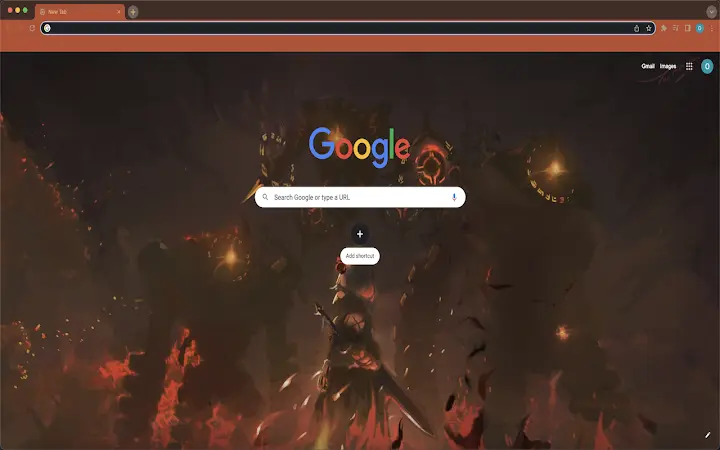

Chrome Theme with Genshin Impact Noelle Design
Overview
The software is a browser theme designed for users of the Chrome web browser, offering a visually immersive experience inspired by the popular game Genshin Impact. It replaces the default Chrome tab interface with a custom design featuring characters and aesthetics from the game, specifically highlighting Noelle. This theme is intended for fans of Genshin Impact who wish to personalize their browsing environment with game-inspired visuals. It serves as a lightweight desktop customization tool, allowing users to express their fandom while using Chrome.
The target audience includes casual users, gamers, and fans of the Genshin Impact franchise who enjoy personalized digital experiences. The theme is particularly suitable for those who spend significant time browsing the web and want a consistent visual connection to their favorite game. It does not alter browser functionality, nor does it introduce new tools or features beyond visual styling.
As a desktop customization utility, it operates within the constraints of browser extensions and themes. The developer did not provide additional details about the development background or company. The theme is designed to be installed and removed easily, with a straightforward process for reverting to default settings.
Key Features & Capabilities
- Genshin Impact Noelle-Themed Design: Replaces the default Chrome tab interface with a custom visual layout inspired by the character Noelle from Genshin Impact, including her signature colors, motifs, and game-specific art elements.
- Easy Browser Integration: Designed specifically for Chrome, the theme integrates seamlessly into the browser’s appearance settings, requiring no complex setup or configuration.
- Instant Visual Customization: Users can apply the theme with a single click through Chrome’s extension management interface, transforming the browser’s look immediately.
- Simple Removal Process: The theme can be uninstalled by resetting the browser’s appearance settings to default, allowing users to revert their browser to its original state without residual effects.
- Lightweight File Size: At 1.5 MB, the theme is minimal in size, ensuring quick download and minimal impact on system resources.
Real-world usage includes personalizing a daily-use browser for gaming enthusiasts who want to maintain a consistent thematic experience. It is ideal for users who enjoy expressing their interests through digital environments, such as fans attending online events or participating in community forums related to Genshin Impact. The theme enhances visual satisfaction without affecting browsing speed or performance.
User Interface, Workflow & Performance
The user interface of the theme is limited to the Chrome browser’s tab bar and background, where the custom design is applied. Navigation within the browser remains unchanged, preserving the familiar workflow of the Chrome environment. The theme does not introduce new menus, toolbars, or interactive elements, ensuring that user experience is not disrupted.
Workflow efficiency is maintained because the theme operates passively. Users can switch between tabs, open new windows, and use extensions without any noticeable delay or interference. The developer did not specify resource usage details, so exact performance impact cannot be confirmed. However, based on general software behavior patterns, lightweight themes like this typically have minimal effect on CPU or RAM usage.
Stability is expected to be high, as the theme functions within Chrome’s standard extension framework. Since it is not a full application but a visual overlay, it is less likely to cause crashes or conflicts with other software. No reported issues with compatibility or system stability were mentioned in the provided information.
Compatibility & System Requirements
The software is compatible with both Windows and Mac operating systems, as specified in the product details. It is designed to work with the Chrome browser, which supports these platforms. The theme has a file size of 1.5 MB, indicating a lightweight installation that does not require significant disk space.
Exact system requirements were not listed. The developer did not provide information on minimum processor speed, RAM, or specific Chrome versions required for compatibility. Platform compatibility information is limited to the operating systems and browser type. No additional hardware or software dependencies were mentioned.
Users should ensure they are running a current version of Chrome to avoid potential issues. The theme may not function correctly on outdated browser versions, though no specific version requirements were provided.
Pros and Cons
Pros
- Visually appealing design inspired by a popular game franchise
- Simple one-click installation and removal
- Minimal file size (1.5 MB) with low system impact
- Free to use with no hidden costs
- Works on both Windows and Mac platforms
Cons
- Only changes visual appearance—no functional enhancements
- No detailed system requirements provided
- Cannot be customized beyond the default design
- Dependent on Chrome browser availability
- Removal requires navigating to browser settings, not a direct uninstall option
FAQ Section
Is this theme safe to install?
The theme is published through Chrome’s official extension gallery and does not include executable code or access to sensitive data. It only modifies visual elements within the browser.
Can I use this theme on multiple devices?
Yes, as long as you have Chrome installed on each device and are signed in to your Google account, you can apply the theme across multiple computers.
Does this theme require an internet connection?
The theme itself does not require an internet connection to function once installed. However, initial installation and updates may require connectivity.
Is the theme compatible with older versions of Chrome?
Compatibility with older Chrome versions is not confirmed. It is recommended to use the latest version of Chrome for optimal performance.
Can I customize the theme’s design?
Currently, the theme is fixed and does not offer customization options. Users cannot modify colors, images, or layout elements.
Final Thoughts
The Chrome Theme with Genshin Impact Noelle Design delivers a focused, aesthetic experience tailored to fans of the game. While it does not introduce new functionality, it successfully enhances the visual appeal of the browser with a well-executed theme. Its lightweight nature and ease of use make it ideal for casual users who value personalization without complexity.
For fans of Genshin Impact, this tool offers a simple yet effective way to bring their favorite character into their daily browsing. It is especially useful for those who want a consistent, immersive theme across their devices. The free price point and broad OS support further increase its accessibility.
While it lacks advanced features, the theme excels in its primary purpose: visual customization. With no performance overhead and straightforward installation, it remains a solid choice for desktop customization enthusiasts.
Download Chrome Theme with Genshin Impact Noelle Design now







